Flymind goes where you go

Flymind is with you — wherever you and your child are

Leave behind folders of cards and lost reports. Visual schedules, tokens, and analytics are now on your phone. Support your child through challenges anywhere — at home, visiting friends, or in the dentist's chair.
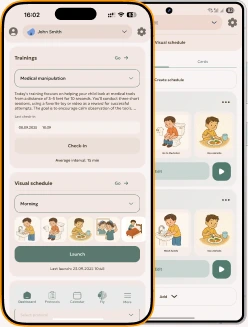
Flymind app

Flymind for iOS and Android

Everything you need for sessions — on your phone. Skill training, visual supports, and progress analytics are always at hand: at home, on the go, at the clinic, or at the playground.


Download on the App Store
Get it on Google Play

"With Flymind's schedule, our morning routine became calmer. My child checks off each step independently — and that keeps them moving forward."

Anna, mother

"Finally, a tool that actually helps at home. Visual cards are what my son understands fastest."

Dmitry, father

"I use Flymind alongside therapy sessions. Automatic data collection and reports save time and make progress transparent."

Elena, specialist

"The app makes it easier to keep the same approach at school and at home. Children adapt to the visual schedule quickly."

Olga, educator

"I love that everything is in one place — cards, schedules, and reports. We're not alone in this anymore."

Irina, mother

What's inside Flymind?

Everything your child needs — in one place. The app helps you organize sessions, see real progress, and restore balance in your life — room for your child's growth and your own rest.
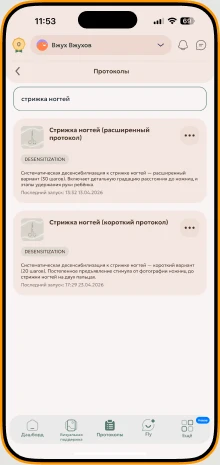
Step-by-step support for difficult routines

Step-by-step support for difficult routines

Ready-made home sessions to help your child practice difficult routines, like nail trimming or haircuts, in small predictable steps.
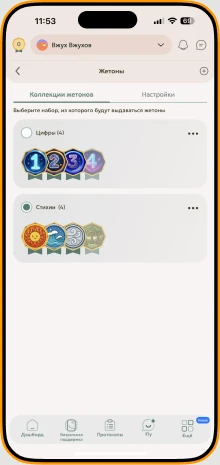
Reinforcement

Reinforcement

A reinforcement system tailored to your child's interests. Use it in the app or download printable templates.
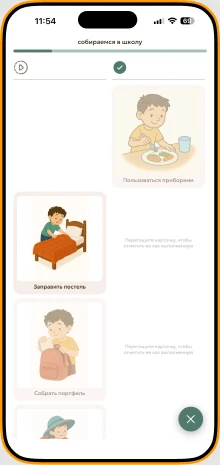
Visual supports

Visual supports

Describe an activity — the app generates a personalized visual card your child will connect with. A daily schedule is ready in minutes.
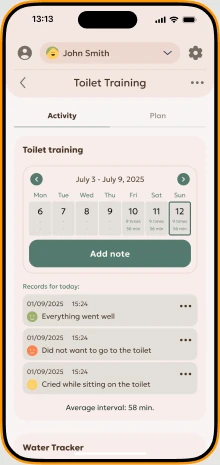
Skill training

Skill training

Step-by-step programs for essential daily living skills — toilet training and medical visits. The app adapts each program to your goals and records every step.
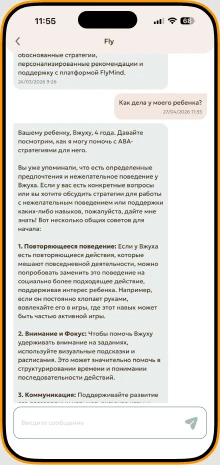
Your personal chat assistant

Your personal chat assistant

The chat assistant knows your session history and suggests what to do next — from choosing an exercise to adjusting the program to your child's current needs.

Frequently asked questions

I've never used ABA methods with my child — can I still use the app?

Yes. Flymind is designed for parents, so you do not need professional training to get started. The app guides you step by step: how to structure a short practice session, use visual supports, and track progress. You will also see simple explanations of key ABA-informed ideas, such as reinforcement, consistency, and observation, written in parent-friendly language.

How can I review suggestions created with AI?

We treat AI as an assistant, not as a specialist. It can help with ideas, structure, visual materials, and saving time, but it does not replace professional judgment. For important goals or more complex situations, it is best to review the plan with a BCBA or another qualified professional. AI suggestions are a starting point; a person should observe how the child responds and adjust the plan when needed.

Can I use the app in my professional practice (for experts)?

Yes. Flymind works well in professional practice. It helps you quickly create visual supports, manage reinforcement systems, and work in different settings — outdoors, at the pool, or in your office — without carrying heavy card folders. In a professional's hands, Flymind can save time on routine work, while your expertise and observation remain central.

Can I add multiple children and track each child's progress?

Yes. You can add multiple child profiles and keep each child's materials separate. Advanced analytics and per-child data collection are currently in development. We plan to release them after the guided plans module. We'll notify you in the app when this feature becomes available.

How much time should I spend on sessions with my child through Flymind?

Think of it like learning a language. One minute a day can help, but progress is usually slower. Regular practice in daily life brings stronger results. Flymind is not about counting hours. What matters most is consistency, clear goals, and understanding why each step matters.

Do I need to buy additional materials or cards — or is everything in the app?

No. You don't need to buy separate card sets. Flymind includes ready-made materials, schedules, and practice ideas — and you can create personalized cards in the app and print them. Additional AI tokens for image generation are available if needed. You can see current options in Pricing.

Is the app suitable for children with different developmental needs?

Yes. Simple step-by-step cards and predictable routines can support children who find new situations harder to navigate. Flymind is not built around a single diagnosis. It supports skill-building, visual routines, and step-by-step practice for children with autism, Down syndrome, rare genetic conditions, and children who need more time, predictability, or clear visual cues.

Can I share progress with other experts or family members?

Yes. You can share materials and session results with specialists, educators, caregivers, and family members — so everyone sees progress and stays aligned. In upcoming updates, we'll expand shared access: parents, specialists, educators, and caregivers will be able to track progress and leave comments directly in the app.

How are the child's and parents' personal data protected?

All personal data is encrypted and stored on secure servers. Only authorized users can access it. We use modern security practices and regularly update our systems to protect confidentiality.

Is there support if I have questions about using the app?

Yes. You can reach our support team through the app or the web version. Email support is also available. We aim to respond quickly and help with questions about using Flymind.

How often are guided plans and training content updated?

We regularly update materials, guided plans, and training content as we improve the product and receive feedback from experts and parents. Major updates come several times a year; smaller improvements happen more often. We notify you in the app about important changes.

Can I use the app without an internet connection?

Most features require internet access for data sync, card generation, and the chat assistant. Saved materials and schedules can be viewed offline if they have already been downloaded to your device. We're working on expanding offline functionality.
Flymind app

Flymind for iOS and Android

Everything you need for sessions — on your phone. Skill training, visual supports, and progress analytics are always at hand: at home, on the go, at the clinic, or at the playground.

Download on the App Store
Get it on Google Play

Try Flymind for free

Parents and experts around the world use Flymind to make daily life and child development simpler and more effective. Join them and see for yourself.

14 days of full access